Shell - Mọi thao tác với tệp và thư mục trên Bash
Note: This post is over 10 years old. The information may be outdated.
Shell bash trên Linux nếu như biết khai thác thì nó sẽ là một công cụ rất mạnh, trong bài này mình sẽ liệt kê các thao tác với tệp và thư mục (copy, move, rename, zip, ...). Like a hacker :))
copy a file
Copy readme.txt vào thư mục documents
cp readme.txt documents/
duplicate a file
cp readme.txt readme.bak.txt
copy a folder
Copy thư mục myMusic vào thư mục myMedia
cp -a myMusic myMedia/
# or
cp -a myMusic/ myMedia/myMusic/
duplicate a folder
Chú ý dấu /
cp -a myMusic/ myMedia/
# or if `myMedia` folder doesn't exist
cp -a myMusic myMedia/
move a file
Di chuyển file readme.txt vào thư mục documents/
mv readme.txt documents/
Luôn sử dụng dấu / cuối thư mục, for this reason.
rename a file
Đổi tên bằng cách move nó
mv readme.txt README.md
move a folder
Tương tự di chuyển file
mv myMedia myMusic/
# or
mv myMedia/ myMusic/myMedia
rename a folder
mv myMedia/ myMusic/
create a new file
Tạo file rỗng
touch 'new file'
or
> 'new file'
create a new folder
mkdir 'untitled folder'
or
mkdir -p 'path/may/not/exist/untitled folder'
show file/folder size
stat -x readme.md
or
du -sh readme.md
open a file with the default program
Mở file trên GUI
open file       # on macOS
xdg-open file   # on Linux
zip a folder
Nén zip 1 thư mục
zip -r archive_name.zip folder_to_compress
unzip a folder
Giải nén file zip
unzip archive_name.zip
remove a file
Xóa hoàn toàn, không thể khôi phục file
rm my_useless_file
remove a folder
rm -r my_useless_folder
list folder contents
Liệt kê nội dung thư mục
ls -la my_folder
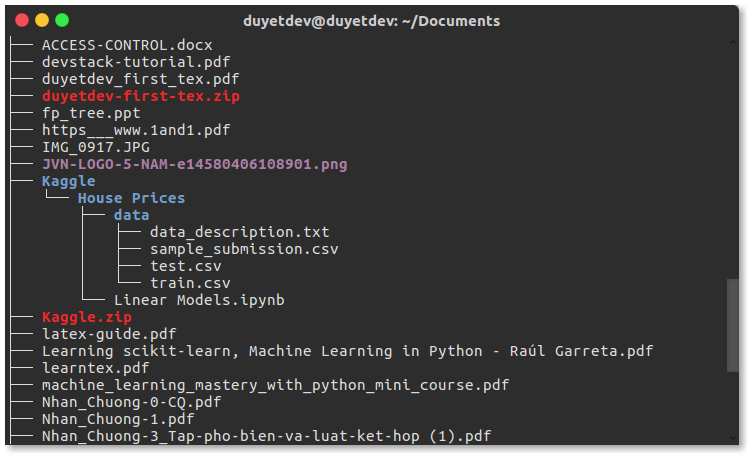
tree view a folder and its subfolders
hiển thị dưới dạng cây thư mục
tree                                                       # on Linux
find . -print | sed -e 's;[^/]*/;|____;g;s;____|; |;g'     # on macOS
find a stale file
Tìm tất cả files modified hơn 5 ngày trước.
find my_folder -mtime +5
Related Posts
Install Odoo 8 in Ubuntu 14.04/15.04
Cài đặt Odoo trên Ubuntu 14.04/15.04
Explain Shell - explainshell.com
Bắt gặp một command linux trong một tutorial trên Internet nhưng không hiểu ý nghĩa của nó, ExplainShell.com sẽ giải thích giúp bạn một cách chi tiết: command đó làm việc gì, ý nghĩa các tham số, v.v ...
Cài đặt OpenVPN trên Debian, Ubuntu và CentOS
OpenVPN là một chương trình mã nguồn mở VPN hoàn toàn miễn phí và đang được xem là giải pháp hoàn hảo nhất cho những ai muốn có một kết nối bảo mật giữa hai mạng. Trong bài này, mình sẽ giới thiệu OpenVPN road warrior installer, một script tự động cài đặt OpenVPN Server rất đơn giản và nhanh chóng.
Linux - một số thủ thuật với trình soạn thảo vim
Vim (hoặc vi) là một trong những editor mạnh mẽ trên terminal Linux. Sau đây là một vài thủ thuật hay khi sử dụng vim trên Linux.