Running Spark in GitHub Actions
This is how to quick and easy guide on how to run Apache Spark in GitHub Actions for testing purposes.
Imagine that I start with an example PySpark app.py script that reads data from a JSON file and performs some basic queries.
import sys

from pyspark.sql import SparkSession

if __name__ == "__main__":
    if len(sys.argv) != 2:
        print("Usage: spark-submit app.py <input>")
        sys.exit(1)

    input_file_path = sys.argv[1]

    spark = SparkSession.builder.appName("Spark").getOrCreate()
    df = spark.read.json(input_file_path)

    df.createOrReplaceTempView("df")

    spark.sql("SELECT * FROM df LIMIT 10").show()
    spark.sql("SELECT COUNT(*) FROM df").show()
    spark.sql("SELECT cn, COUNT(*) FROM df GROUP BY cn ORDER BY 2 DESC").show()
    spark.sql("SELECT cn, MAX(temp) AS max_temp FROM df GROUP BY cn ORDER BY 2 DESC").show()
In local, we can submit it via
spark-submit app.py <input>
To run this PySpark script in GitHub Actions,
I've create a workflow file named spark-submit.yaml
in the .github/workflows/ directory. The spark-submit.yaml file defines the steps that
GitHub Actions should take to run the PySpark script using the spark-submit command.
File: .github/workflows/spark-submit.yaml
name: Spark Submit

on:
  push:
    branches:
      - 'master'

jobs:
  spark-submit:
    runs-on: ubuntu-latest

    strategy:
      matrix:
        python:
          - '3.10'
          - '3.11'
        spark:
          - 3.3.2
          - 3.4.0

    steps:
      - uses: actions/checkout@v3

      - uses: actions/setup-python@v4
        with:
          python-version: ${{ matrix.python }}

      - uses: actions/setup-java@v3
        with:
          java-version: '17'
          distribution: 'temurin'

      - uses: vemonet/setup-spark@v1
        with:
          spark-version: ${{ matrix.spark }}
          hadoop-version: '3'

      - run: spark-submit app.py data.json
Here is the result detail for each run in Github Actions:
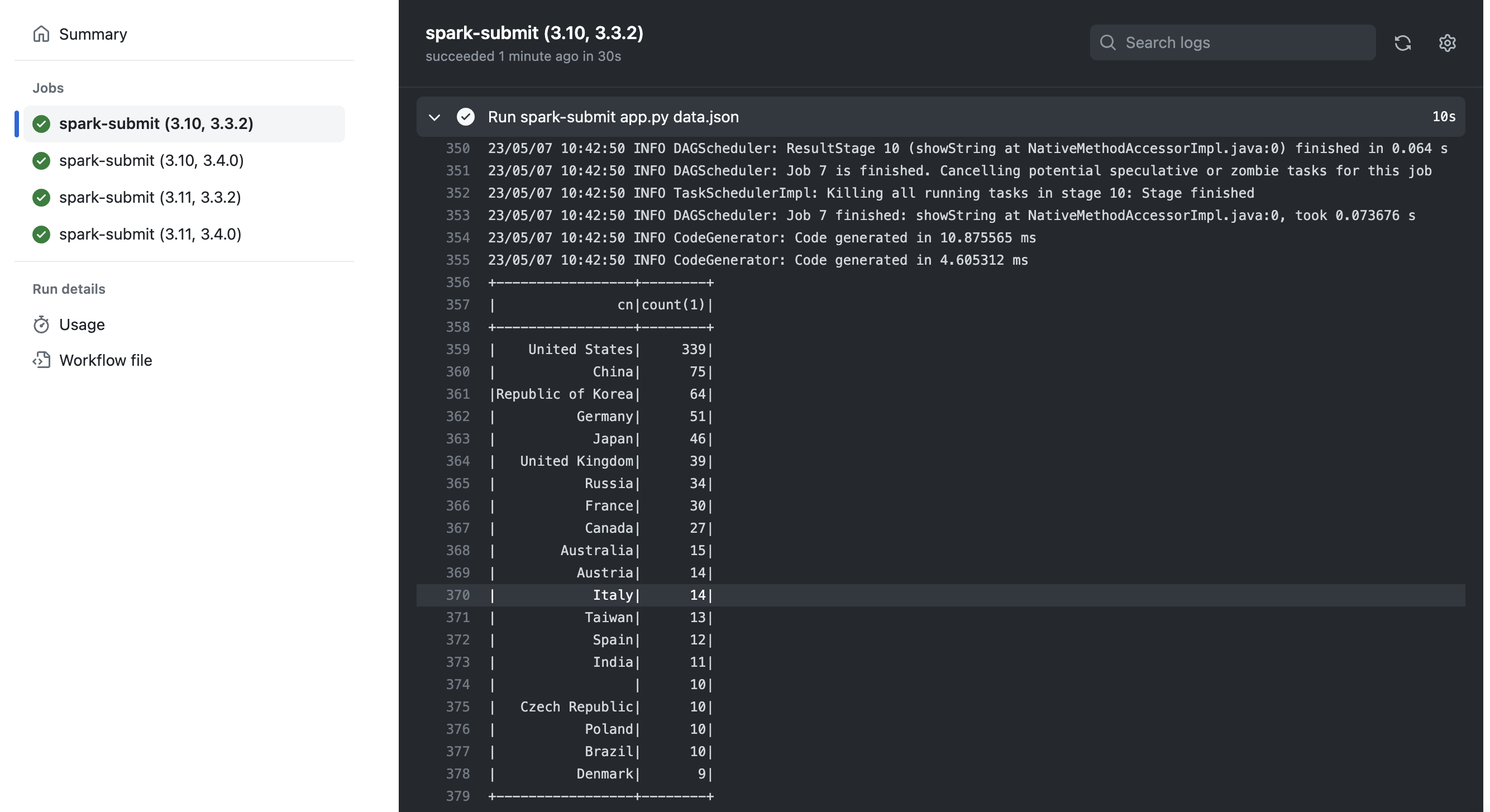
The spark-submit.yaml file also specifies the matrix strategy to test the PySpark script on multiple versions of Python and Spark. In this example, the PySpark script will be tested on:
- Python 3.10, Spark 3.3.2.
- Python 3.10, Spark 3.4.0.
- Python 3.11, Spark 3.3.2.
- Python 3.11, Spark 3.4.0.

This is useful for ensuring that your PySpark script works correctly on different versions of Python and Spark. Additionally, you can add Spark unit tests and run them via Github Actions to ensure that all tests pass before merging PRs.
That's it. You can find all code in my repo: https://github.com/duyet/spark-in-github-actions
References
Related Posts
Cài Apache Spark standalone bản pre-built
Mình nhận được nhiều phản hồi từ bài viết BigData - Cài đặt Apache Spark trên Ubuntu 14.04 rằng sao cài khó và phức tạp thế. Thực ra bài viết đó mình hướng dẫn cách build và install từ source.
DuckDB
In this post, I want to explore the features and capabilities of DuckDB, an open-source, in-process SQL OLAP database management system written in C++11 that has been gaining popularity recently. According to what people have said, DuckDB is designed to be easy to use and flexible, allowing you to run complex queries on relational datasets using either local, file-based DuckDB instances or the cloud service MotherDuck.
Airflow control the parallelism and concurrency (draw)
How to control parallelism and concurrency
GPT vs Traditional NLP Models
The field of Natural Language Processing (NLP) has seen remarkable advancements in recent years, and the emergence of the Generative Pre-trained Transformer (GPT) has revolutionized the way NLP models operate. GPT is a cutting-edge language model that employs deep learning to generate human-like text. Unlike conventional NLP models, which required extensive training on specific tasks, GPT is pre-trained on vast amounts of data and can be fine-tuned for various NLP tasks