Spark on Kubernetes - better handling for node shutdown
Note: This post is over 5 years old. The information may be outdated.
Nodes Decommissioning
Spark 3.1 on the Kubernetes project is now officially declared as production-ready and Generally Available. Spot instances in Kubernetes can cut your bill by up to 70-80% if you are willing to trade in reliability.
Now, If you use EC2 Spot or GCP Preemptible instances for costs optimization, in such a scenario, these instances can go away at any moment, and you may need to recompute the tasks they executed. On a shared cluster where the jobs with a higher priority can take the resources used by lower priority and already running jobs.
The new feature - SPIP: Add better handling for node shutdown (SPARK-20624) was implemented to deal with the problem of losing an executor when working with spot nodes - the need to recompute the shuffle or cached data.
Before this feature
Before this feature, executor pods are lost when a node kill occurs and shuffle files are lost as well. Therefore driver needs to launch new executors, recomputing the tasks.
With the feature
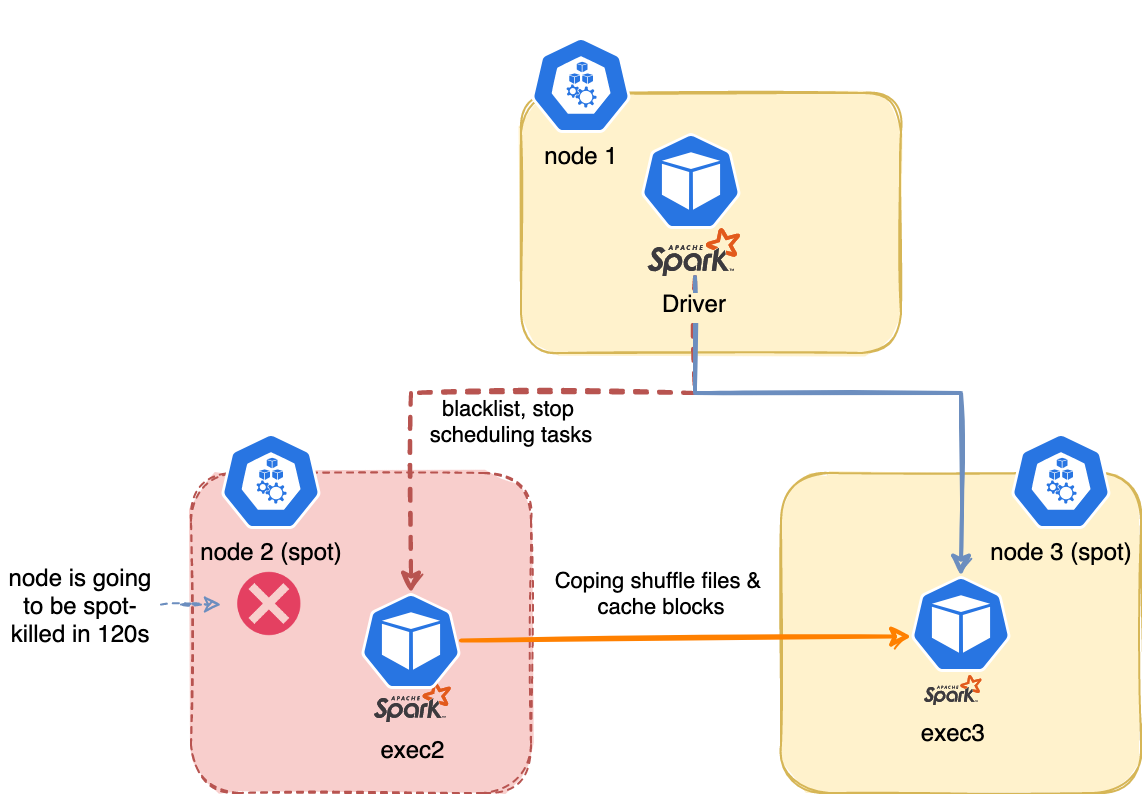
When a node kill occurs, the executor on the spot which is going away is blacklisted. The driver will stop scheduling new tasks on it. The task will be marked as failure (not counting to the max retries).
Shuffle files and cached data are migrated to another executor. We can also config the spark.storage.decommission.fallbackStorage.path=s3a://duyet/spark-storage/ to S3 during block manager decommissioning. The storage should be managed by TTL or using spark.storage.decommission.fallbackStorage.cleanUp=true to clean up its fallback storage data during shutting down.
How to enable this?
We need to config the the Spark configs to turn it on
spark.decommission.enabled: When decommission enabled, Spark will try its best to shutdown the executor gracefully.spark.storage.decommission.rddBlocks.enabled: Whether to transfer RDD blocks during block manager decommissioningspark.storage.decommission.shuffleBlocks.enabled: Whether to transfer shuffle blocks during block manager decommissioning. Requires a migratable shuffle resolver (like sort based shuffle).spark.storage.decommission.enabled: Whether to decommission the block manager when decommissioning executor.spark.storage.decommission.fallbackStorage.path: The location for fallback storage during block manager decommissioning. For example,s3a://spark-storage/. In case of empty, fallback storage is disabled. The storage should be managed by TTL because Spark will not clean it up.
Please referring to the source code to look at the other available configurations.
Install Node Termination Event Handler to the Kubernetes Cluster. Please looking into projects for:
- AWS: https://github.com/aws/aws-node-termination-handler
- GCP: https://github.com/GoogleCloudPlatform/k8s-node-termination-handler
- Azure: https://github.com/diseq/k8s-azspot-termination-handler
These projects provide an adapter for translating node termination events to graceful pod terminations in Kubernetes so that Spark Decommission can handle them.
References
Related Posts
Spark on Kubernetes tại Fossil 🤔
Hành trình chuyển đổi Apache Spark từ AWS EMR sang Kubernetes tại Fossil Data Platform. Tìm hiểu kiến trúc hệ thống với Spark Operator, Spark Submit Worker, và Spark Jobs UI. Bài viết chia sẻ chi tiết về lý do migration, kiến trúc microservices, GitOps workflow, và các tối ưu hóa performance trên Kubernetes production environment.
Cài Apache Spark standalone bản pre-built
Mình nhận được nhiều phản hồi từ bài viết BigData - Cài đặt Apache Spark trên Ubuntu 14.04 rằng sao cài khó và phức tạp thế. Thực ra bài viết đó mình hướng dẫn cách build và install từ source.
Running Spark in GitHub Actions
This post provides a quick and easy guide on how to run Apache Spark in GitHub Actions for testing purposes
Chạy Apache Spark với Jupyter Notebook
IPython Notebook là một công cụ tiện lợi cho Python. Ta có thể Debug chương trình PySpark Line-by-line trên IPython Notebook một cách dễ dàng, tiết kiệm được nhiều thời gian.