MergeTree
After starting this series ClickHouse on Kubernetes, you can now configure your first single-node ClickHouse server. Let's dive into creating your first table and understanding the basic concepts behind the ClickHouse engine, its data storage, and some cool features
- Creating a Basic Table
- MergeTree Engine
- ORDER BY
- Insert data
- UNDROP 🤯
- DETACH/ATTACH
- TTL
- LowCardinality(T) column data type
Creating a Basic Table
Here's a basic example of a table using the MergeTree engine:
CREATE TABLE events
(
    `event_time` DateTime,
    `event_date` Date DEFAULT toDate(event_time),
    `user_id` UInt32,
    `event_type` String,
    `value` String
)
ENGINE = MergeTree
PARTITION BY toYYYYMM(event_date)
ORDER BY (user_id, event_time)
ClickHouse column data types include (full list)
- Integer types: signed and unsigned integers (
UInt8,UInt16,UInt32,UInt64,UInt128,UInt256,Int8,Int16,Int32,Int64,Int128,Int256) - Floating-point numbers: floats(
Float32andFloat64) andDecimalvalues - Boolean: ClickHouse has a
Booleantype - Strings:
StringandFixedString - Dates: use
DateandDate32for days, andDateTimeandDateTime64for instances in time - JSON: the
JSONobject stores a JSON document in a single column - UUID: a performant option for storing
UUIDvalues - Low cardinality types: use an
Enumwhen you have a handful of unique values, or useLowCardinalitywhen you have up to 10,000 unique values of a column - Arrays: any column can be defined as an
Arrayof values - ...
MergeTree Engine
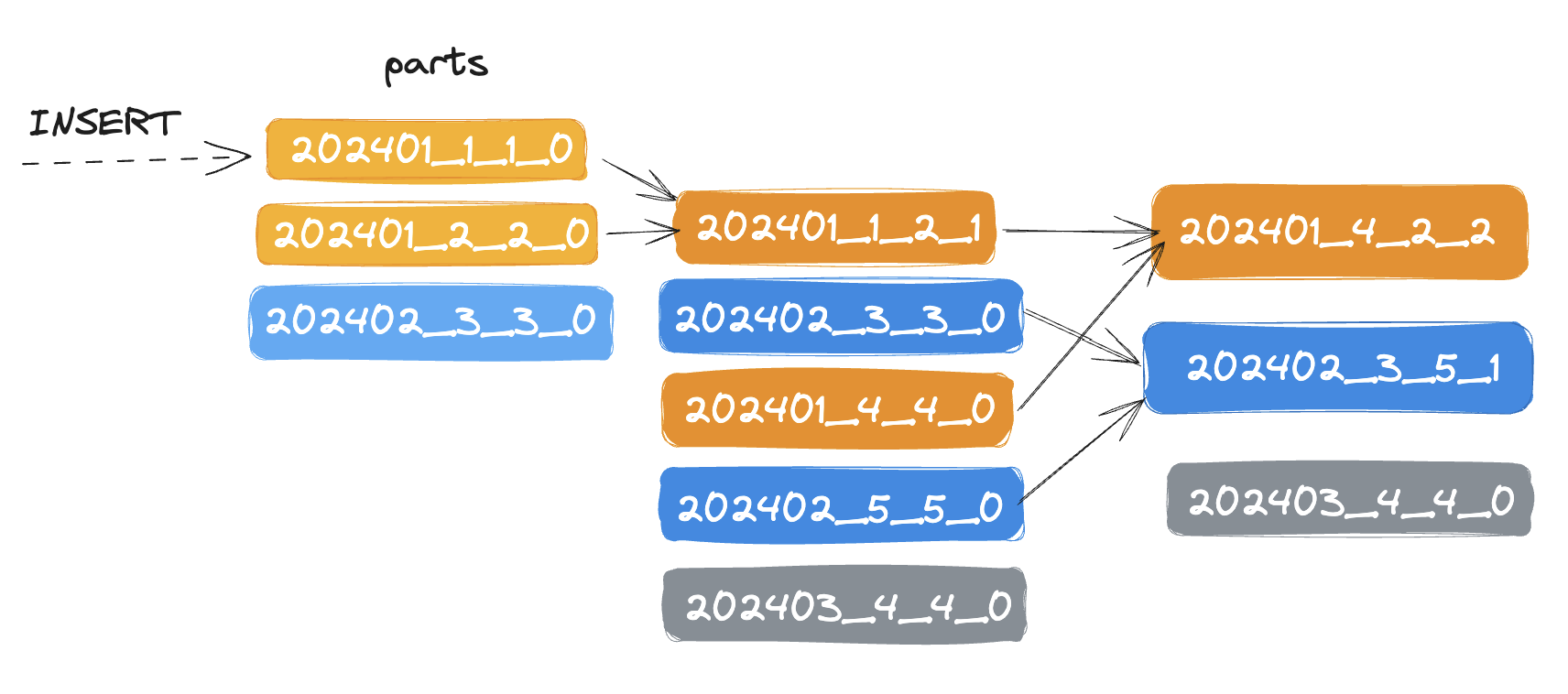
The MergeTree engine and other engines of this family (*MergeTree) are the most commonly used and most robust ClickHouse table engines. The data is quickly written to the table part by part, and merging the parts in the background.
PARTITION BY toYYYYMM(event_date)
Each partition is stored in a separate folder
202401/202402/- ...
ClickHouse also automatically cuts off the partition data where the partitioning key is specified in the query. The partition key cannot be modified. In most cases, you don't need a partition key. Don't partition your data by client identifiers or names.
ORDER BY
ORDER BY (user_id, event_date)
The data will be merged and sorted by (user_id, event_time). This data is stored as separate parts (chunks) sorted by the primary key. Within 10-15 minutes after insertion, the parts of the same partition are merged into a complete part. Note that a part is different from a partition; a part is a smaller unit within a partition. Use the ORDER BY tuple() syntax, if you do not need sorting.
Insert data
Inserts data into a table.
INSERT INTO events (event_time, user_id, event_type, value)
VALUES
	(now(), 111, 'click', '/home'),
	(now(), 222, 'click', '/blog');
SELECT * FROM events;

┌──────────event_time─┬─event_date─┬─user_id─┬─event_type─┬─value─┐
│ 2024-05-31 08:13:27 │ 2024-05-31 │     111 │ click      │ /home │
│ 2024-05-31 08:13:27 │ 2024-05-31 │     222 │ click      │ /blog │
└─────────────────────┴────────────┴─────────┴────────────┴───────┘
event_date is automatic assign by the DEFAULT toDate(event_time). It is also possible to use DEFAULT keyword to insert default values:
INSERT INTO events VALUES (now(), DEFAULT, 333, 'click', '/insights')
SELECT * FROM events

Query id: f7d18374-4439-4bfb-aa2f-478a7269f45d

┌──────────event_time─┬─event_date─┬─user_id─┬─event_type─┬─value─────┐
│ 2024-05-31 08:16:36 │ 2024-05-31 │     333 │ click      │ /insights │
└─────────────────────┴────────────┴─────────┴────────────┴───────────┘
┌──────────event_time─┬─event_date─┬─user_id─┬─event_type─┬─value─┐
│ 2024-05-31 08:13:27 │ 2024-05-31 │     111 │ click      │ /home │
│ 2024-05-31 08:13:27 │ 2024-05-31 │     222 │ click      │ /blog │
└─────────────────────┴────────────┴─────────┴────────────┴───────┘
When using the clickhouse client binary in the terminal, you can see that the returned data is separated into two blocks because the data has not been merged yet. Check the number of parts:
SELECT table, partition, name, rows, path
FROM system.parts
WHERE database = 'default' AND table = 'events'

┌─table──┬─partition─┬─name─────────┬─rows─┬─path─────────────────────────────────────────────────────────────────────────────┐
│ events │ 202405    │ 202405_1_1_0 │    2 │ /var/lib/clickhouse/store/410/410ccafd-c5ac-48b7-93e6-42b6a82f4ece/202405_1_1_0/ │
│ events │ 202405    │ 202405_2_2_0 │    1 │ /var/lib/clickhouse/store/410/410ccafd-c5ac-48b7-93e6-42b6a82f4ece/202405_2_2_0/ │
└────────┴───────────┴──────────────┴──────┴──────────────────────────────────────────────────────────────────────────────────┘
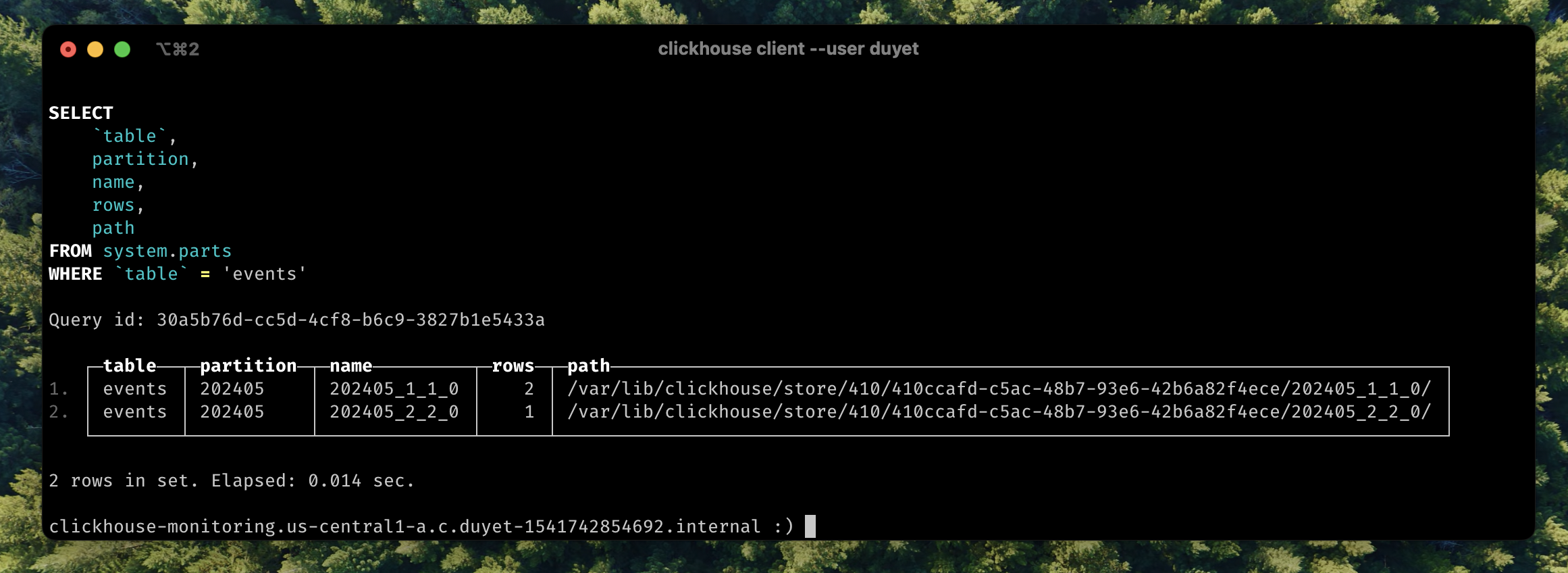
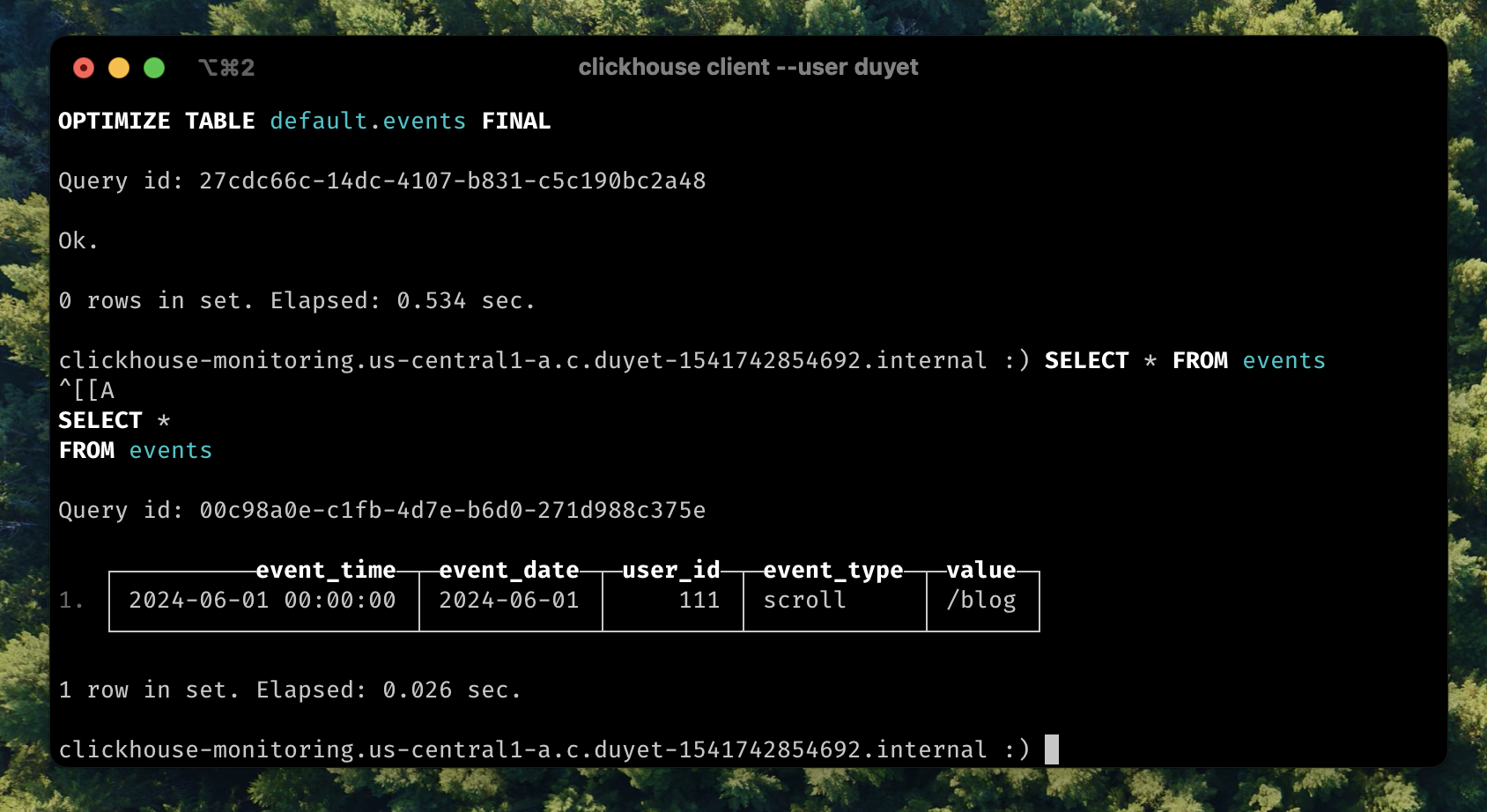
Data is not merged yet, there is many to make it happens like OPTIMIZE table:
OPTIMIZE TABLE default.events FINAL
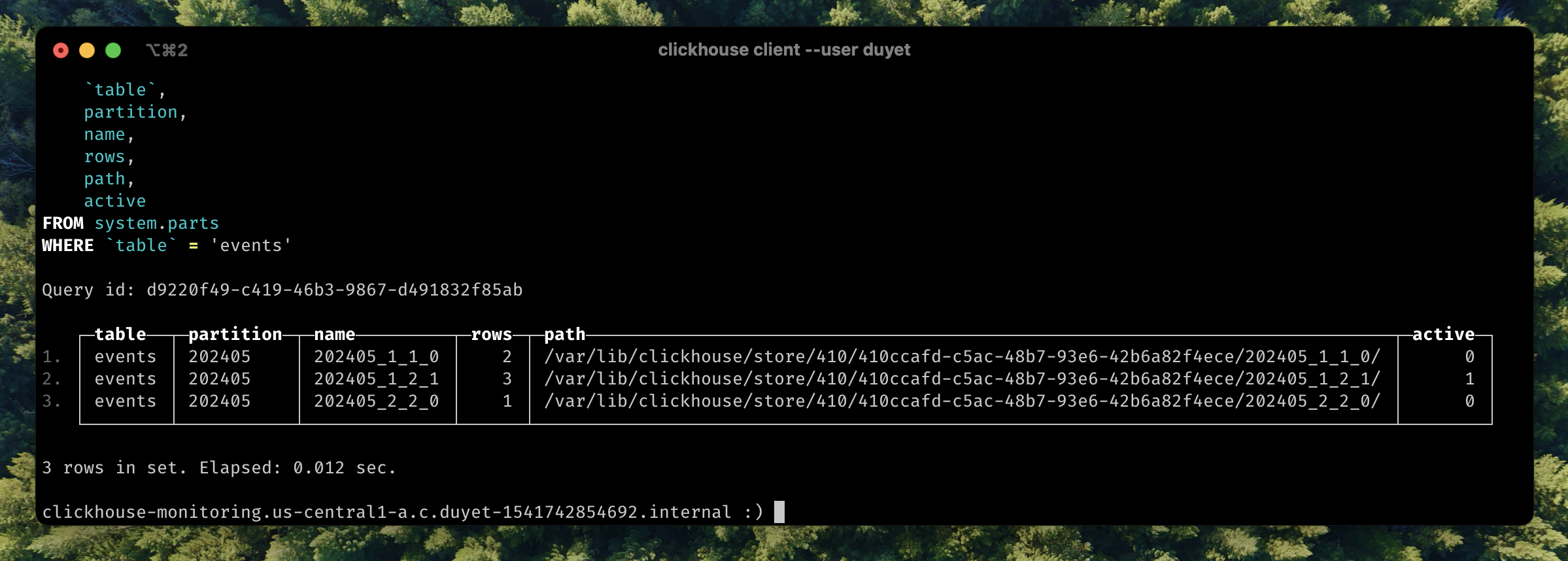
ClickHouse will merge into new part 202405_1_2_1 mark it as active part, and inactive will be clean up later.
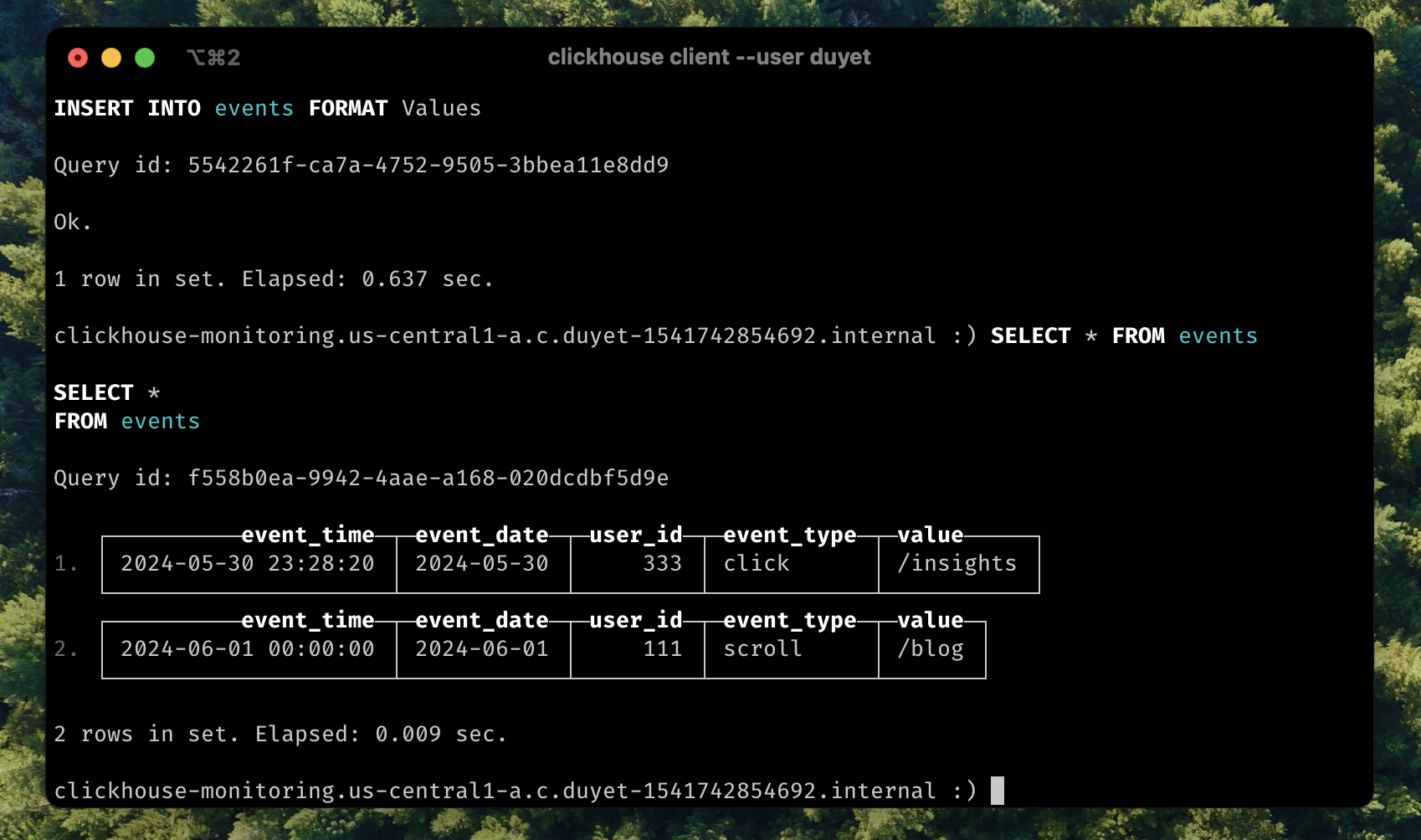
Insert by FORMAT
Data can be passed to the INSERT in any format supported by ClickHouse. The format must be specified explicitly in the query, for example:
INSERT INTO events FORMAT JSONEachRow
{"event_time": "2024-06-01 00:00:00", "user_id": "111", "event_type": "scroll", "value": "/blog"}

Ok.
Bonus: You can change the data format returns from SELECT query:
SELECT * FROM events LIMIT 3 Format CSV;

"2024-05-31 09:40:00","2024-05-31",16089454,"click","/insights"
"2024-05-31 09:40:00","2024-05-31",16089454,"click","/insights"
"2024-05-31 09:40:00","2024-05-31",16089454,"click","/insights"
Some common formats for Input and Output data
UNDROP 🤯
Like every other database engine, you can DROP one or more tables, but you can even UNDROP them within up to 8 minutes (by default, can be adjusted using the database_atomic_delay_before_drop_table_sec setting).
DROP TABLE events;
UNDROP TABLE events;
DETACH/ATTACH
Detaching a table makes the server "forget" about the existence of the table. This action does not delete the data or metadata of the table. I usually DETACH it when encountering some issues that need to be fixed under the file system, and then ATTACH it to scan and load it back.

TTL
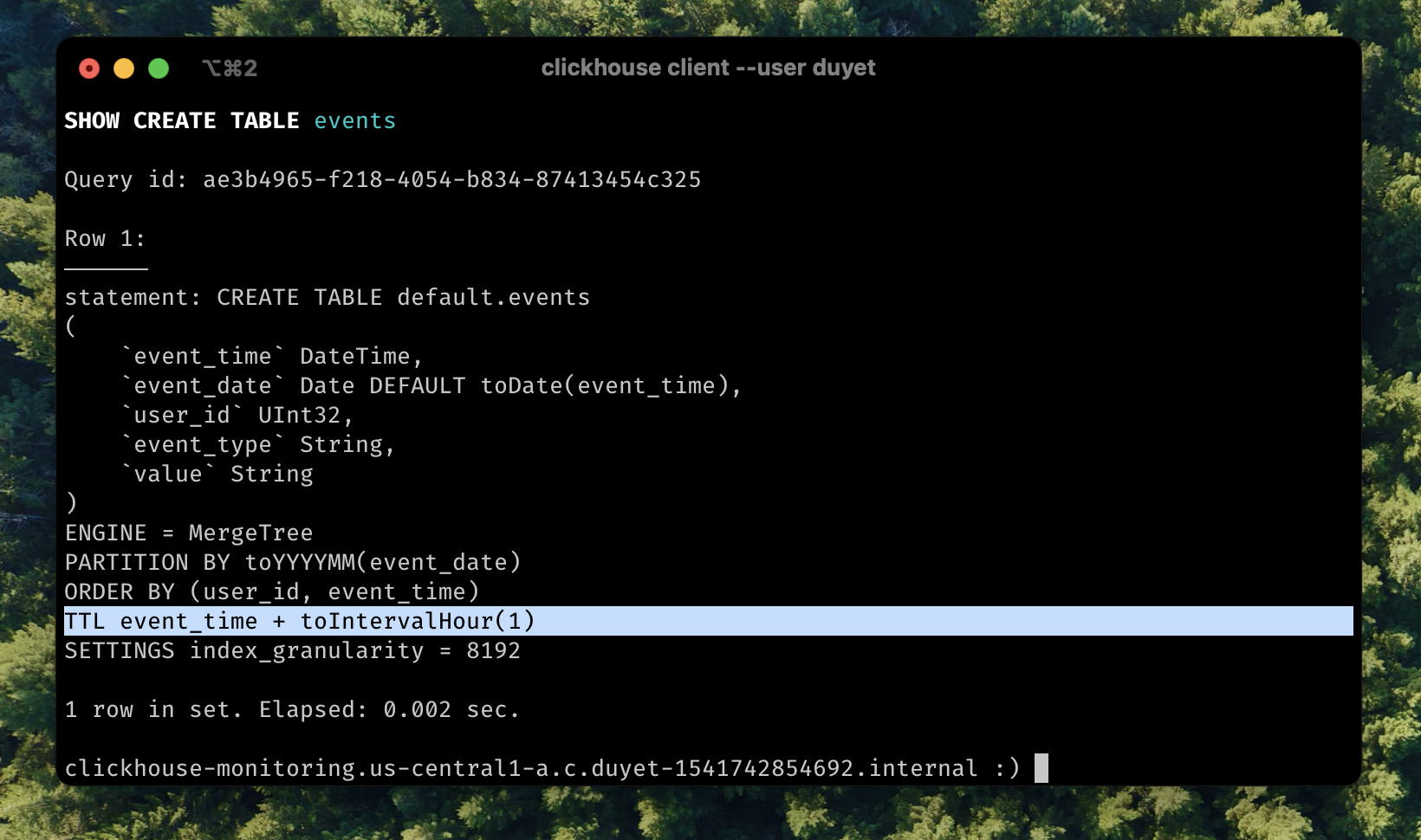
TTL (time-to-live) refers to the capability of moving, deleting, or rolling up rows or columns after a certain interval of time has passed. This actually happens when data is being merged. TTL can be applied to each column or the whole row level. More detail in document.
Now modify the table above:
ALTER TABLE events MODIFY TTL event_time + INTERVAL 1 HOUR;
Insert old data:
INSERT INTO events VALUES (now() - interval 10 hour, DEFAULT, 333, 'click', '/insights');

-- Quickly select the data
SELECT * FROM events;
After for a while or to force TTL cleanup by OPTIMIZE:
OPTIMIZE TABLE events FINAL;
SELECT * FROM events;
Second row was deleted from table.
LowCardinality(T) column data type
If you have a column like this
SELECT event_type FROM events;

┌─event_type─┐
│ click      │
│ pageview   │
│ pageview   │
│ pageview   │
│ pageview   │
│ pageview   │
│ click      │
│ click      │
│ click      │
│ click      │
│ pageview   │
│ pageview   │
│ pageview   │
│ pageview   │


SELECT event_type, COUNT() FROM events GROUP BY 1;

┌─event_type─┬──count()─┐
│ click      │ 17563648 │
│ scroll     │   262144 │
│ pageview   │ 15466496 │
└────────────┴──────────┘

3 rows in set. Elapsed: 28.517 sec. Processed 33.29 million rows, 512.75 MB (1.17 million rows/s., 17.98 MB/s.)
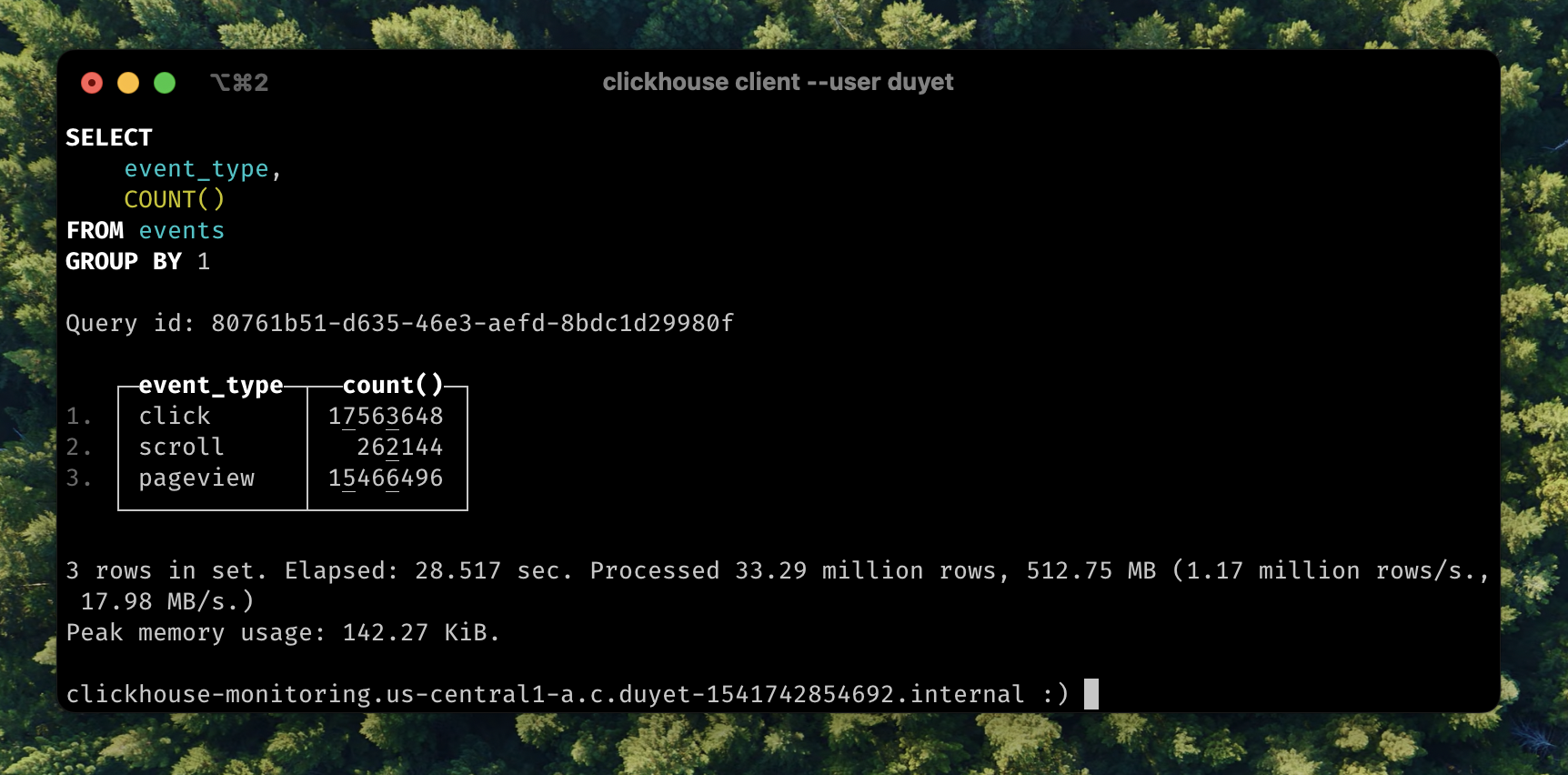
The value is repeated. Consider using Enum when you have a handful of unique values or LowCardinality when you have up to 10,000 unique values (e.g. click, pageview,...) of a column.
Let’s look at how event_type column are stored
SELECT
    column,
    any(type),
    formatReadableSize(sum(column_data_compressed_bytes)) AS compressed,
    formatReadableSize(sum(column_data_uncompressed_bytes)) AS uncompressed,
    round(sum(column_data_uncompressed_bytes) / sum(column_data_compressed_bytes), 2) AS compr_ratio,
    sum(rows)
FROM system.parts_columns
WHERE (`table` = 'events') AND active AND (column = 'event_type')
GROUP BY column
ORDER BY column ASC

┌─column─────┬─any(type)─┬─compressed─┬─uncompressed─┬─compr_ratio─┬─sum(rows)─┐
│ event_type │ String    │ 1.04 MiB   │ 233.25 MiB   │      225.34 │  33292288 │
└────────────┴───────────┴────────────┴──────────────┴─────────────┴───────────┘
I will change the type of the event_type column to LowCardinality. This can be done with a simple spell that looks like an ALTER TABLE statement.
ALTER TABLE events
  MODIFY COLUMN `event_type` LowCardinality(String);

0 rows in set. Elapsed: 99.556 sec.
This took 99 seconds in my tiny server. Now checking the column size again:
SELECT
    column,
    any(type),
    formatReadableSize(sum(column_data_compressed_bytes)) AS compressed,
    formatReadableSize(sum(column_data_uncompressed_bytes)) AS uncompressed,
    round(sum(column_data_uncompressed_bytes) / sum(column_data_compressed_bytes), 2) AS compr_ratio,
    sum(rows)
FROM system.parts_columns
WHERE (`table` = 'events') AND active AND (column = 'event_type')
GROUP BY column
ORDER BY column ASC

┌─column─────┬─any(type)──────────────┬─compressed─┬─uncompressed─┬─compr_ratio─┬─sum(rows)─┐
│ event_type │ LowCardinality(String) │ 151.16 KiB │ 31.56 MiB    │      213.81 │  33292288 │
└────────────┴────────────────────────┴────────────┴──────────────┴─────────────┴───────────┘
The storage size has been reduced x7 times, and compressed is just now only 151 KiB. In some case you even get better compr_ratio. This also improved query performance:
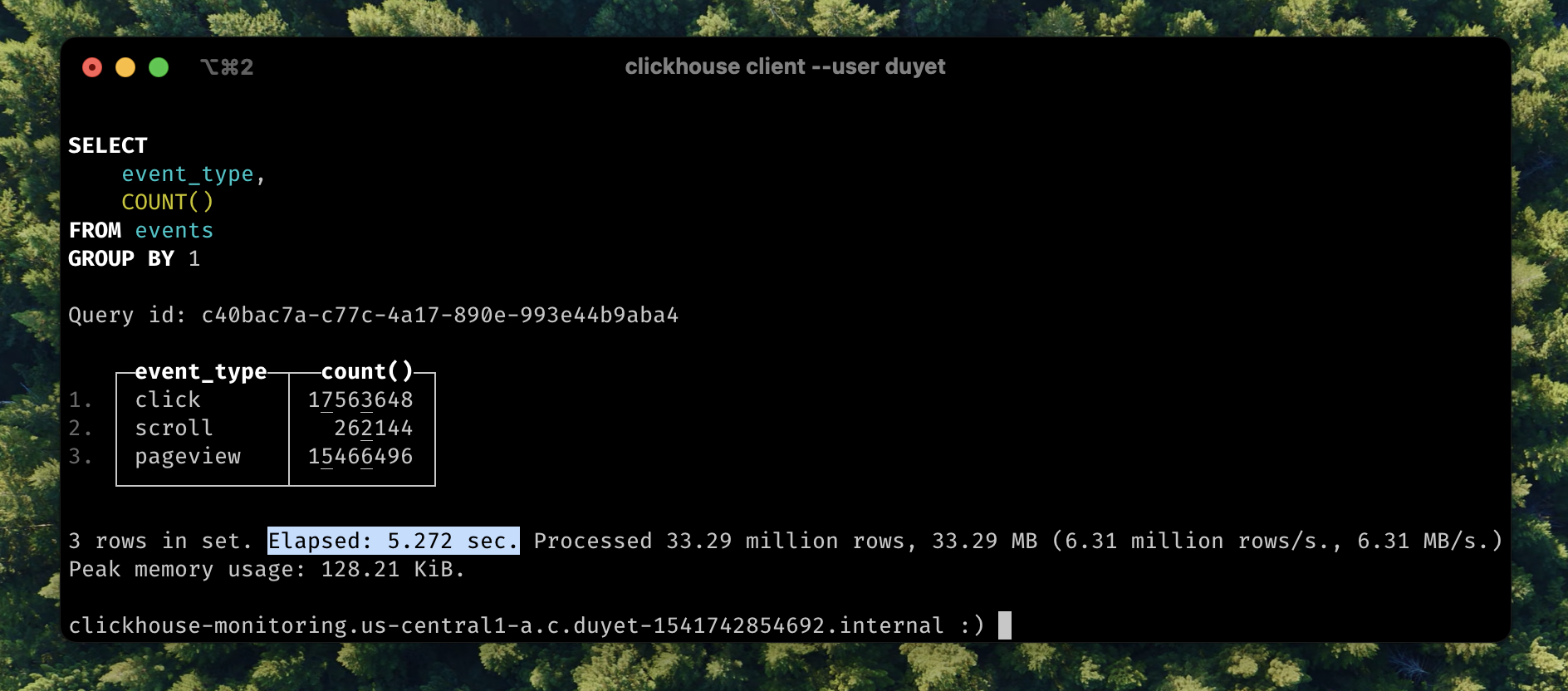
SELECT event_type, COUNT() FROM events GROUP BY 1;

- 3 rows in set. Elapsed: 28.517 sec. Processed 33.29 million rows, 512.75 MB (1.17 million rows/s., 17.98 MB/s.)
+ 3 rows in set. Elapsed: 5.272 sec. Processed 33.29 million rows, 33.29 MB (6.31 million rows/s., 6.31 MB/s.)
The query now runs 5.41 times faster. LowCardinality changes the internal representation of other data types to be dictionary-encoded.
Series: ClickHouse on Kubernetes
Complete guide to deploying ClickHouse on Kubernetes using the Altinity ClickHouse Operator. Learn how to set up your first single-node cluster, configure persistent storage, manage users, and customize ClickHouse versions. Includes practical examples and best practices from production experience managing clusters with trillions of rows.
Dynamic column selection (also known as a `COLUMNS` expression) allows you to match some columns in a result with a re2 regular expression.
Complete guide to monitoring ClickHouse on Kubernetes. Learn about built-in dashboards, Prometheus + Grafana setup, powerful system tables for monitoring queries, and the ClickHouse Monitoring UI dashboard. Includes practical examples, essential monitoring queries, and best practices for production observability.
After starting this series ClickHouse on Kubernetes, you can now configure your first single-node ClickHouse server. Let's dive into creating your first table and understanding the basic concepts behind the ClickHouse engine, its data storage, and some cool features
My favorite ClickHouse table engine is `ReplacingMergeTree`. The main reason is that it is similar to `MergeTree` but can automatically deduplicate based on columns in the `ORDER BY` clause, which is very useful.
Learn how to set up and manage ReplicatedReplacingMergeTree in ClickHouse on Kubernetes. This comprehensive guide covers cluster setup with ClickHouse Operator, data replication, performance tuning, and best practices for high availability deployments.
Related Posts
ReplicatedReplacingMergeTree
Learn how to set up and manage ReplicatedReplacingMergeTree in ClickHouse on Kubernetes. This comprehensive guide covers cluster setup with ClickHouse Operator, data replication, performance tuning, and best practices for high availability deployments.
ReplacingMergeTree
My favorite ClickHouse table engine is `ReplacingMergeTree`. The main reason is that it is similar to `MergeTree` but can automatically deduplicate based on columns in the `ORDER BY` clause, which is very useful.
Monitoring ClickHouse on Kubernetes
Complete guide to monitoring ClickHouse on Kubernetes. Learn about built-in dashboards, Prometheus + Grafana setup, powerful system tables for monitoring queries, and the ClickHouse Monitoring UI dashboard. Includes practical examples, essential monitoring queries, and best practices for production observability.
ClickHouse SELECT Advances
Dynamic column selection (also known as a `COLUMNS` expression) allows you to match some columns in a result with a re2 regular expression.